
Turnover Clean Windows: Vacation Rental Cleaning Guide
How turnover clean windows work for vacation rental cleaning. Manage the time between guests, avoid same-day stress, and coordinate Airbnb turnovers.

What Is a Turnover Clean Window?
A turnover clean window is the time between when one guest checks out of your vacation rental and the next guest checks in. Whether you handle vacation rental cleaning yourself, hire an Airbnb or VRBO turnover service, or coordinate with a dedicated cleaner, that's the window to get the property cleaned, restocked, and guest-ready.
It sounds simple, and in concept, it is. But for anyone who has actually managed a vacation rental, you know this window is where the operational complexity lives.
Your checkout time might be 11 AM. Your check-in might be 3 PM. That's four hours on paper. But your cleaner needs travel time, the clean itself takes two to four hours depending on the property, and there's no buffer for anything going wrong: a late checkout, a guest who left a mess, a broken appliance that needs attention.
This window is the single most time-sensitive part of running a vacation rental. Get it right, and your guests arrive to a spotless property. Get it wrong, and you're dealing with the kind of phone call no host ever wants to receive.
Why Clean Windows Matter More Than You Think
Most vacation rental owners focus on bookings, pricing, and guest communication. Those are important. But the turnover clean window is what determines whether all that work translates into a five-star review or a one-star disaster.
Your Reviews Depend on It
Cleanliness is consistently the number-one factor guests mention in negative Airbnb and VRBO reviews. Not the location, not the amenities, the clean. And turnover cleaning failures are almost always a function of the clean window: either it didn't happen, it was rushed, or something was missed because the cleaner didn't have enough time.
A property with 200 five-star reviews can see its ranking tank from a single one-star review about cleanliness. The platforms' algorithms weight recent reviews heavily, so one missed clean can suppress your listing's visibility for weeks.
Your Cleaner's Stress Level Depends on It
A well-managed clean window means your cleaner knows exactly when they need to be there, how much time they have, and what to expect. A poorly managed one means rushed work, unclear timelines, and the constant anxiety of "is this going to be tight?"
Good cleaners are hard to find. If you want to keep yours, giving them clear, reasonable clean windows is one of the most important things you can do.
Your Financial Risk Depends on It
A missed clean isn't just a bad review. It can mean an emergency cleaner at premium rates, a refunded stay, and a guest who tells everyone they know about the experience. I've personally experienced this. a single missed turnover clean cost me thousands in refunds and emergency cleaning fees.
How Much Time Do You Need Between Guests?
This is the question every host asks, and the honest answer is: it depends on your property.
The Math
Most vacation rental turnover cleans take between one and four hours, depending on property size, guest count, and how the previous guests left the place. On top of the clean itself, you need to account for your cleaner's travel time to the property and a buffer for the unexpected: a late checkout, extra mess, or a supply run.
Here's a rough guide:
A studio or one-bedroom typically needs two to three hours total. A two-to-three-bedroom property usually requires three to five hours. Anything larger: four-plus bedrooms: can take a full day, especially if linens need laundering on-site.
Common Checkout and Check-in Times
Airbnb's default checkout time is 11 AM and default check-in is 3 PM. VRBO follows a similar pattern, though hosts can customize both. That default gives you a four-hour window, which works for smaller properties but gets tight quickly for larger ones.
Many experienced hosts set their checkout at 10 AM and check-in at 4 PM to create a six-hour window. That extra two hours makes a meaningful difference for your cleaner, especially on same-day turnovers.
Same-Day Turnovers: The Tightest Window
A same-day turnover is when one guest checks out and the next guest checks in on the same day. These are the most stressful scenarios for cleaners and the most common source of missed-clean disasters.
They're also inevitable if you want to maximize occupancy. Back-to-back bookings are how you hit high occupancy rates, and the platforms' algorithms actually favor listings with high availability. So refusing same-day turnovers means leaving money on the table.
The key isn't avoiding same-day turnovers, it's managing them. Your cleaner needs to know about them immediately, with clear checkout and check-in times, so they can plan their day accordingly. Surprises are what cause failures.
When the Window Is Bigger Than a Day: The Flexibility Nobody Talks About
Here's what most vacation rental content gets wrong: they focus exclusively on the stressful same-day scenario. In reality, a huge number of your clean windows are longer than a single day. A guest checks out on Sunday, and the next guest doesn't arrive until Wednesday. That's a three-day window. Sometimes it's a week. Sometimes it's two weeks.
And that longer window is a gift, if you use it well.
Why Your Cleaner Loves a Multi-Day Window
Your cleaner almost certainly has other clients. They're cleaning other vacation rentals, residential homes, or commercial spaces. When you give them a same-day window, they have to drop everything and prioritize your property. That's fine when it's necessary: but when it's not necessary, why create that pressure?
A multi-day clean window lets your cleaner fit your property into their existing schedule. They can batch your clean with other nearby jobs, choose a day that works for their workload, and do the job without feeling rushed. This isn't just a nice-to-have, it's how you keep a great cleaner long-term. Cleaners who feel respected and given reasonable timelines are cleaners who stick around.
The "Pop By" Strategy: Check for Damage Without Rushing the Clean
Here's something I learned after years of hosting: you don't always need the full clean done on day one. What you often need on day one is eyes on the property.
When a guest checks out and you have a multi-day window, consider asking your cleaner to pop by the property the same day or next morning, not to do the full clean, but to do a quick walkthrough. Are there any damages? Did the guest leave the place in bad shape? Is there anything you need to report to the platform or address before reviews close?
That quick check protects you. You can file damage claims, leave an honest review, and address any issues, all while giving your cleaner the flexibility to schedule the actual clean for a day that works better for them. It's the best of both worlds: immediate property intelligence and flexible clean scheduling.
The Damage Claim Deadline: A Hard Reason to Keep Clean Windows Short
Here's a detail that makes the clean window decision more than just a matter of convenience, it's a financial protection issue.
Both Airbnb and VRBO give you a limited window to report guest damage and file a claim. If you miss that window, you lose your right to reimbursement, no matter how clear the damage is.
Airbnb gives you 14 days after the responsible guest's checkout date to file a reimbursement request through their Resolution Center, this is a hard requirement before Airbnb will consider any damage claim under Host Damage Protection. An older "whichever comes first" rule (14 days or before the next guest checks in) was effectively dropped when AirCover launched, so the next guest's arrival no longer resets your deadline. That said, filing immediately after any turnover is still critical practice: the longer you wait, the harder it becomes to attribute specific damage to a specific guest, and Airbnb can deny claims on evidentiary grounds. If you need Airbnb Support to step in after the guest doesn't pay, you have a separate 30-day window from checkout to escalate the claim with full documentation. (Airbnb Host Damage Protection Terms. Section 3.1.2 & 3.3 | AirCover for Hosts overview)
VRBO gives you up to 14 days after checkout to inspect your property and file a damage claim, and the clock starts immediately. If you've set a refundable damage deposit, VRBO holds those funds during the stay and then automatically refunds the full amount to the guest once that window closes with no claim filed. Here's the detail many hosts miss: the refund timeline is actually host-configurable. You can set it to either 7 or 14 days in your account settings, which means your window could be shorter than you think if you've never reviewed that setting. Once the refund processes, your leverage is gone. The same 14-day deadline applies if you're using the card-on-file option instead of an upfront deposit. (VRBO Help: About refundable damage deposits | VRBO damage deposit policy details)
This has a direct impact on your clean window strategy. If you give your cleaner a 10-day window and they don't get to the property until day 9, you're still technically within both platforms' deadlines. But you've lost nine days of evidence clarity, was that scratch on the floor from the last guest or did it happen while the property sat empty? The longer you wait, the weaker your claim becomes, even if you're within the deadline.
The pop-by strategy I mentioned earlier isn't just about convenience. It's about protecting your ability to make a damage claim while the evidence is fresh, clearly attributable to a specific guest, and well within the filing window.
How Long Should You Give Your Cleaner? My Three-Day Rule
After ten years of experimenting with different approaches, I've settled on a default: three days maximum.
Giving your cleaner the full window sounds generous, and it is. But it introduces real risks. If the next guest isn't arriving for two weeks, and you give your cleaner the full window, every once in a while they'll take the very last day. That's human nature: the deadline is far away, other clients are more urgent, so your property slides to the bottom of their list.
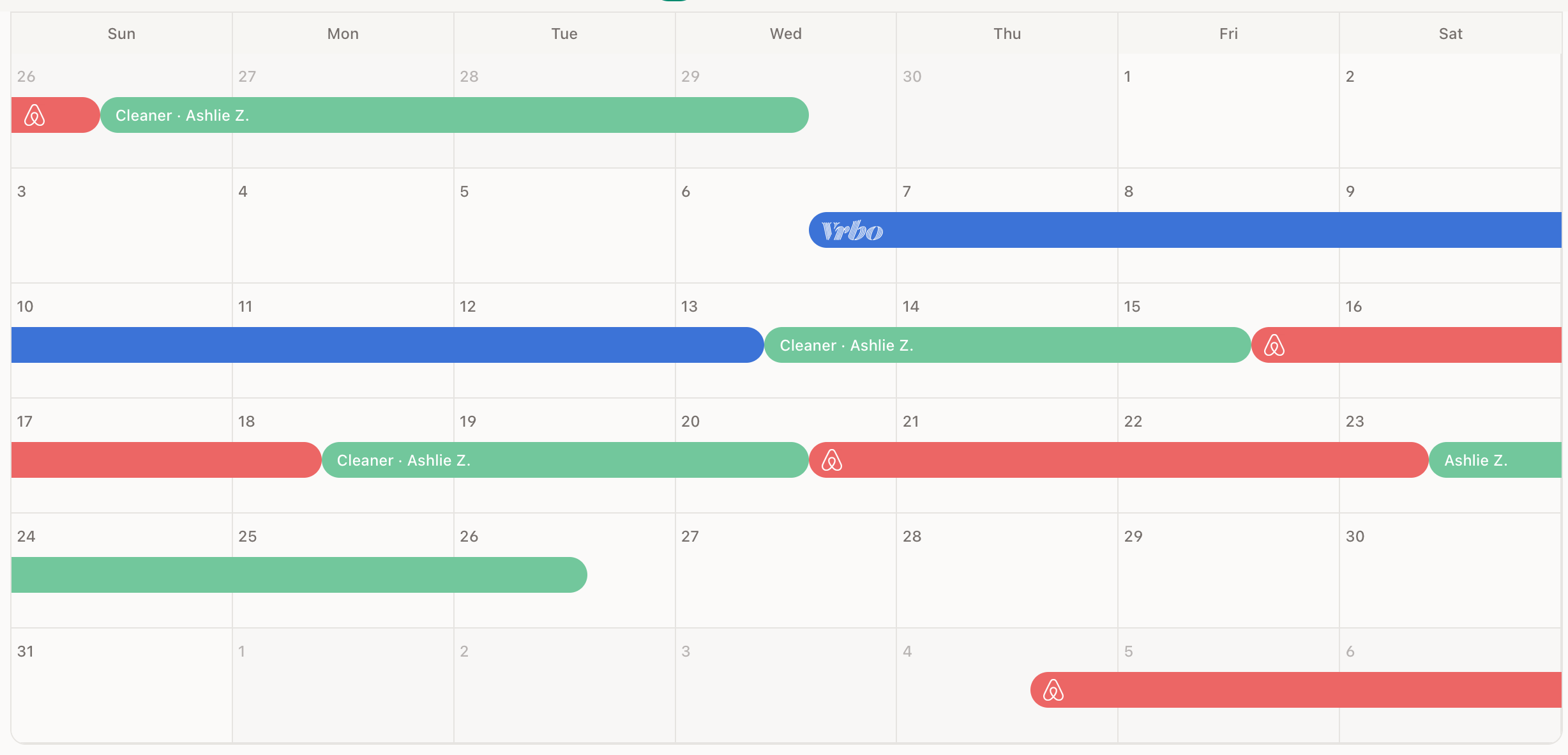 GleamSync's calendar view: green bars show clean windows between guest stays, with the cleaner assigned to each turnover.
The problem is what happens in the meantime. Garbage from the last guest starts to smell. If the place was left exceptionally dirty, that mess is sitting there for days. And when your cleaner finally shows up on that last day, they sometimes discover a clean that takes longer than expected: maybe the previous guest left a bigger mess than usual, or something needs extra attention. Now they're running into the check-in deadline with no buffer.
A three-day default keeps you well inside the 14-day damage claim window on both platforms. Your cleaner gets meaningful flexibility, three days to fit your property into their schedule alongside their other clients. That's a huge improvement over same-day pressure. But it's bounded enough that your property isn't sitting unattended, garbage doesn't fester, any damage gets spotted and documented promptly, and you have plenty of time to file a claim if needed.
The only time I set the full window is when my cleaner specifically requests it: maybe they're going on vacation and need to schedule around it, or there's a personal situation that requires extra flexibility. But as a default? Three days. It's the sweet spot between respecting your cleaner's time and protecting your property and your finances.
The Pitfalls: Where Clean Windows Go Wrong
After ten years of running a vacation rental, I've seen every way a clean window can fall apart. Here are the most common:
The Booking Change You Forgot to Pass Along
A guest requests an early check-in. You approve it on the platform. But you forget to update your cleaner. They're working off the original schedule, and the guest arrives to a dirty unit.
This is the single most common cause of turnover failures, not because the cleaner dropped the ball, but because the communication chain broke. The booking platforms don't automatically notify your cleaner when dates change. That's on you.
The Same-Day Turnover That Wasn't Flagged
A new booking comes in that creates a same-day turnover. Your cleaner was planning on a relaxed afternoon clean with a one-day buffer. Now they've got four hours. But nobody told them the timeline changed.
The Back-to-Back That Isn't Actually Possible
Sometimes the math just doesn't work. A checkout at 11 AM and a check-in at 2 PM on a four-bedroom property with on-site laundry? Your cleaner physically cannot do a thorough clean in three hours. But the booking was accepted, the guest is coming, and now you're scrambling.
The fix is proactive: set minimum gaps in your platform settings, or use a tool that flags tight windows so you can address them before they become emergencies.
The Cleaner Who Didn't Get the Notes
This clean requires something extra: the guest had pets, or they used the hot tub, or there were extra beds set up. But your cleaner didn't get the notes in time, so they did a standard clean and missed the specifics. The next guest notices. This is why many hosts keep a vacation rental turnover cleaning checklist for each property, not just the standard tasks, but the conditional extras that apply to specific Airbnb or VRBO stays.
How to Get Clean Windows Right
The good news is that most turnover failures are coordination failures, not cleaning failures. Your cleaner is perfectly capable of doing a great job, they just need the right information at the right time.
The difference between stressful vacation rental cleaning and smooth operations, whether you use a turnover service or manage cleans directly, isn't how fast your cleaner works, it's how early they get the information. Every fix above is a communication fix, not a cleaning fix.
Set Realistic Checkout and Check-in Times
Give yourself the widest window your market will support. If your competitors all offer 3 PM check-in, you probably need to match it. But checkout time is more flexible. 10 AM versus 11 AM rarely affects booking decisions, and it gives your cleaner an extra hour.
Communicate Every Change Immediately
When a booking changes: dates shift, a cancellation happens, an early check-in is approved, your cleaner needs to know immediately. Not at the end of the day, not when you get around to it. Immediately.
This is where manual systems break down. If you're relying on texts or a shared spreadsheet, every booking change requires you to manually update your cleaner. It works when you're paying attention. It fails when you're busy, distracted, or on vacation yourself.
Flag Same-Day Turnovers Proactively
Same-day turnovers shouldn't surprise your cleaner. They should be identified as soon as the booking is confirmed and communicated with the specific time constraints: "checkout at 10 AM, check-in at 3 PM, you have five hours."
Track Clean Fees and Extras Transparently
If a clean requires extra work: pet cleanup, deep cleaning, extra beds, your cleaner should know in advance and be compensated accordingly. Keeping clean fees organized and transparent prevents resentment and keeps the relationship healthy.
How GleamSync Automates All of This
I built GleamSync to solve exactly these problems, because I was living them myself for a decade.
GleamSync syncs your Airbnb and VRBO calendars automatically. When a booking comes in, changes, or cancels, GleamSync computes the clean window, the exact time between guest checkout and the next check-in, and notifies your cleaner via email, SMS, or WhatsApp.
Flexible Clean Deadlines, Not Just Same-Day
This is where GleamSync goes beyond what other tools offer. You can set a default clean deadline for each property that determines how much of the available window your cleaner gets:
You might set it to same-day if you want the property cleaned immediately after checkout. Or within one day, two days, or three days, whatever balances your need for a quick turnaround with your cleaner's scheduling reality. Or you can give your cleaner the full window between guests, which might be a few days or a few weeks.
That default gets applied to every clean automatically. But here's the smart part: if a booking creates a same-day turnover, GleamSync overrides your default and flags it as a same-day clean, because your cleaner needs to know that this one is time-sensitive regardless of your usual preference. A three-day default doesn't help when the next guest arrives tonight.
And if a specific clean needs a different deadline, maybe you want this particular turnover done quickly because the guest mentioned bringing pets, you can adjust the clean window for that individual clean without changing your default.
This kind of flexibility is what keeps the relationship with your cleaner healthy. They know what to expect, they can plan their schedule around your properties, and they're not constantly dealing with artificial urgency on cleans that don't need it.
Everything Else, Automated
Same-day turnovers are flagged automatically. If a booking change shifts the clean window, your cleaner gets an updated notification immediately. You don't have to remember to text them. You don't have to update a spreadsheet.
Your cleaner sees their upcoming schedule, the time constraints for each clean, any notes you've added, and the cleaning fee, all without needing to download an app or create an account. They just get a notification on the channel they already use.
The whole point is to take the coordination burden off your plate and out of your memory, so the only thing between a great guest experience and a terrible one isn't your ability to remember to send a text.
Share this article

Mark Fromson
Founder of GleamSync and vacation rental owner. Learn more
Related Articles
Airbnb Deep Clean vs. Turnover Clean: When to Do Each
Airbnb deep clean vs turnover clean: what each includes, how often to schedule them, cost comparisons, and how to coordinate both with your cleaner.
The Complete Vacation Rental Inventory Checklist
A room-by-room vacation rental inventory checklist for Airbnb and VRBO hosts. Track kitchen items, linens, electronics, and supplies on every turnover.
Airbnb Checkout Instructions: What Every Host Should Include
Create clear Airbnb checkout instructions that keep guests happy and your cleaner on schedule. What to ask for, what to skip, and how to automate the reminders.
Simplify Your Cleaning Coordination
Sync Airbnb, VRBO, Booking.com or any calendar with a link, notify your cleaners automatically, and never miss a turnover.
Start Free Trial